








Attendant Console
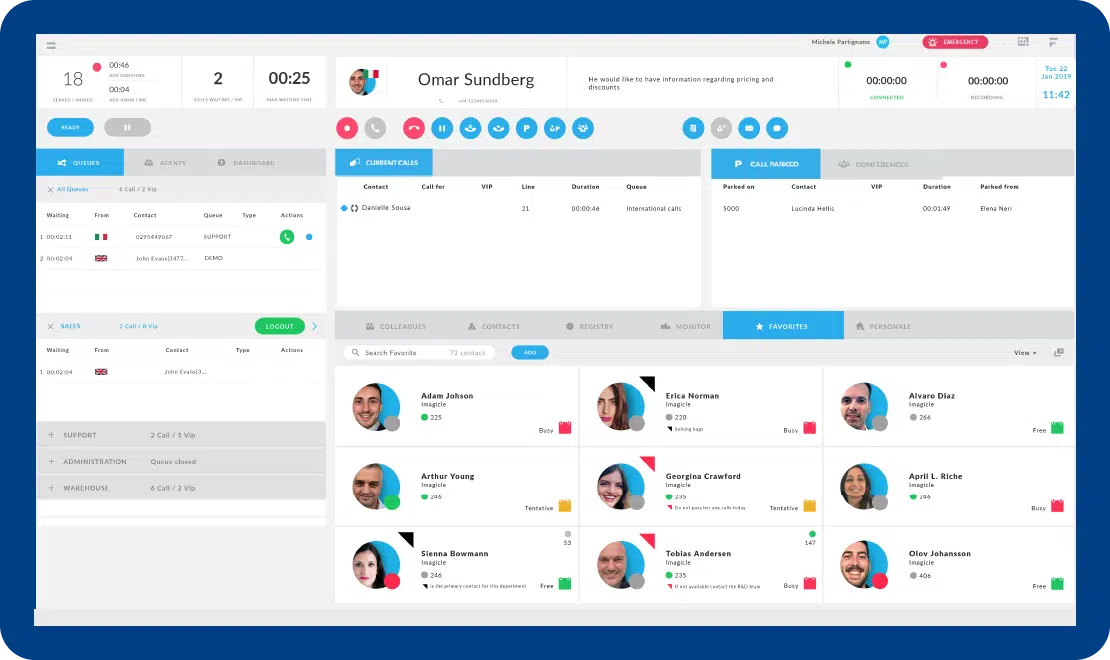
Imagicle Attendant Console is the operator console solution that simplifies and improves the handling of incoming and outgoing calls for all operators.
The best telephone experience for your customers.
Your calls just a click away
Answering, transfering and parking, queue management, and call recording.
Keep everything under control
Colleagues, contacts, favorites, active calls panel and much more.
Integrated with your directories
All contacts available within seconds, wherever they are stored.
Available for everyone
Compatible with assistive tools for visually impaired and blind users.
Ideal for Smart Working
Same user experience on all devices, in the office and remotely.
A complete front desk
Perfect to handle front desk call handling. For more advanced needs, see Imagicle contact center software.
Your calls just a click away
Answering, transfering and parking, queue management, and call recording.
Keep everything under control
Colleagues, contacts, favorites, active calls panel and much more.
Integrated with your directories
All contacts available within seconds, wherever they are stored.
Available for everyone
Compatible with assistive tools for visually impaired and blind users.
Ideal for Smart Working
Same user experience on all devices, in the office and remotely.
A complete front desk
Perfect to handle front desk call handling. For more advanced needs, see Imagicle contact center software.
Integrated with the solutions you love.








Details that make the difference.
Everything is just a click away.


Integrated with Microsoft 365 and Exchange calendars.


Listen and guide your operators.


Available for everyone.
Integrated with your directories.


Clearly visible panic button.
Get the most out of it.

AI Virtual Receptionist
AI Virtual Receptionist answers FAQs, books appointments, and transfers calls - automating your front desk in a few clicks. Start your free trial today.
Learn More
Auto Attendant
Route every incoming call automatically with a multi-level IVR: time-based menus, holiday schedules and voice prompts for Cisco, Webex and Microsoft Teams.
Learn More
Advanced Queueing
Improve incoming call management, optimize resources, reduce customer waiting time and welcome your customers at best.
Learn More
Advanced Services

ImagicleCare





Attendant Console Tech Specs.
Compatible calling platforms.
What calling platforms is Attendant Console compatible with?
Platforms listed in the following table have been verified for operation with the product. Imagicle solutions are based on technological standards and therefore operate with many of the most commonly used systems on the market. Should your system not be listed, please contact our technical department to check interoperability. Cloud Connector, Office365 and Teams are currently not supported.
| Producer | System | Release | Certifications | Notes |
|---|---|---|---|---|
| Avaya-Nortel | IP Office | 8.x- 9.x- 10.x- 11.x | Desktop CTI only- for blind and short-sighted operators- without Advanced Queueing support | |
| BroadSoft | BroadWorks | R22.0 and above | BroadSoft Compatible | supports Cisco IP Phones- Webex Desktop client and Broadsoft UC One softphone for operators |
| CISCO | HCS | 8.6- 9.x- 10.x- 11.x-12.x-14.x | supports Cisco IP Phones- Webex Desktop and Jabber Desktop clients for operators | |
| CISCO | Unified Communications Manager (Included Webex Calling Dedicated) | 8.6- 9.x- 10.x- 11.x- 12.x-14.x | Cisco Compatible | supports Cisco IP Phones- Webex Desktop and Jabber Desktop clients for operators |
| CISCO | Unified Communications Manager Business Edition 6000 | 8.6- 9.x- 10.x- 11.x-12.x-14.x | Cisco Compatible | supports Cisco IP Phones- Webex Desktop and Jabber Desktop clients for operators |
| CISCO | Unified Communications Manager Business Edition 7000 | 8.6- 9.x- 10.x- 11.x-12.x-14.x | Cisco Compatible | supports Cisco IP Phones- Webex Desktop and Jabber Desktop clients for operators |
| CISCO | Webex Calling Multi-Tenant | supports Cisco MPP Phones and Webex Desktop client for operators | ||
| Microsoft | Skype for Business Server 2015/2019 | Operator/Agent leverages standard S4B client and Attendant Console on the same PC. | ||
| Microsoft | Microsoft Teams | ACS-Based UCX Attendant Console, including softphone features. |
Compatible endpoints
What endpoints is Attendant Console compatible with?
| Product | Producer | Phone | Certifications | Notes |
|---|---|---|---|---|
| Attendant Console | CISCO | 6900 series | ||
| Attendant Console | CISCO | 7800 series | ||
| Attendant Console | CISCO | 7900 series | ||
| Attendant Console | CISCO | 8800 series | ||
| Attendant Console | CISCO | 8900 series | ||
| Attendant Console | CISCO | 9900 series | ||
| Attendant Console | CISCO | IP Communicator | ||
| Attendant Console | CISCO | Webex Desktop and Jabber Desktop clients | ||
| Attendant Console | MICROSOFT | ACS-Based UCX Attendant Console, including softphone features. |
Certifications.


Advanced Services